Ahmad Foysal · · 4 min read
MikroTik Hotspot Voucher Not Working on a New Phone? Fix It From Your Phone
Why a paid voucher refuses to log in on a new phone, the three things to clear on the router, and how to do it without opening Winbox.
Everyone who runs a MikroTik hotspot knows this call: "I paid for the voucher, I changed my phone, and now it says the login is wrong." The voucher is fine and still has time left. It is tied to the old phone.
This page shows why it happens, how to fix it by hand in Winbox, and how to do the same thing from Telegram while you are away from the router.
Why the voucher stops working
A MikroTik hotspot can remember a customer in three places.
| What the router keeps | Where | What it causes |
|---|---|---|
| The phone's MAC address on the user | IP → Hotspot → Users | The voucher only logs in from that one device |
| A cookie (saved login) | IP → Hotspot → Cookies | The old phone logs in by itself and holds the voucher |
| The active session | IP → Hotspot → Active | With one shared user allowed, the new phone is refused |
Many voucher systems bind the MAC address on first login, so that one voucher cannot be shared by a whole room. That is sensible, and it is also why a new phone is refused.
Fix it by hand in Winbox
- Open IP → Hotspot → Users, find the voucher code and open it. Clear the MAC Address field and press OK.
- Open the Cookies tab and remove the entry for that user.
- Open the Active tab and remove the session for that user.
Or in a terminal, with your own code in place of A7K29Q:
/ip hotspot user set [find name="A7K29Q"] mac-address=00:00:00:00:00:00
/ip hotspot cookie remove [find user="A7K29Q"]
/ip hotspot active remove [find user="A7K29Q"]
The customer can now log in on the new phone. The used time and the limits do not change.
This works well when you are sitting at the router. The trouble starts when you are at work, on the road or asleep, and the router has no public IP, so you cannot even open Winbox.
Fix it from Telegram in ten seconds
With RemoteMikroTik the router keeps an encrypted tunnel to our server, so it can be reached even with no public IP. On Pro the same three steps are one button in Telegram.
- Send
/voucher A7K29Qto the RemoteMikroTik bot (or the short form/v A7K29Q). - The bot looks on all your online routers and shows the voucher: profile, used time, the MAC it is tied to and whether it is online.
- Press ♻️ Reset. The bot removes the MAC address, clears the cookie and ends the session, then confirms.
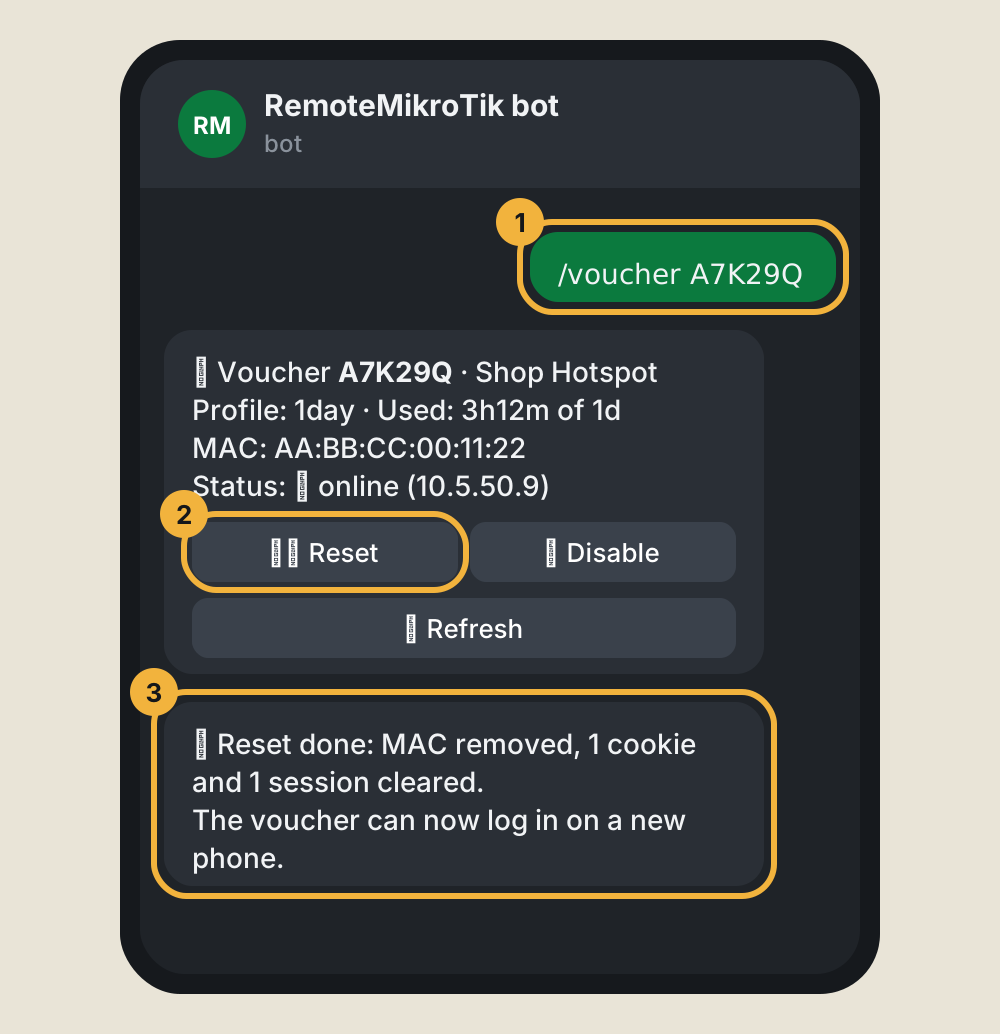
You do not need to know which router the voucher is on. If you manage several buildings, the bot searches all of them.
What else the bot can do
- ⛔ Disable blocks a voucher, after asking once more. ✅ Enable turns it back on.
/ppp NAMEdoes the same job for a PPPoE customer: remove the MAC lock, disconnect, disable or enable./statuslists your routers and which are online.- When a router has been offline for 10 minutes, the bot tells you, and tells you again when it is back.
Every action is written to Recent actions on the router's page, so you can see later who did what.
What it does not do
The bot checks and fixes vouchers. It does not create them and it does not add time. Keep making vouchers the way you do now, with User Manager, Winbox or your voucher tool.
Set it up
- Create an account at https://remotemikrotik.com and add your router. Paste the setup script into a Winbox terminal on the router. The details are in Add your first router.
- Choose the Pro plan for that router.
- Open Profile → Notifications and press Connect Telegram. See Connect Telegram.
- Send
/voucherwith a real code to test it.
Common questions
Does Reset let two people share one voucher?
No. After a reset the voucher can log in again on any one device, and your hotspot profile still decides how many devices may use it at once.
The bot says the voucher was not found.
Check the code first. The bot lists the routers it searched. A router that is offline is shown as not reachable, and a voucher on that router cannot be found until it is back.
Can my helper use it too?
The bot answers only the Telegram account linked to your own panel account. A team member gets a separate panel login and can use the router pages you allow. See Team access.
Will it work with my voucher software?
Reset works on standard hotspot users on the router. If your vouchers are ordinary entries under IP → Hotspot → Users, it works.
Next steps
Read the full guide: Reset a hotspot voucher from Telegram. Not ready for a paid plan? The Free plan still gives you Winbox from anywhere for one router, so you can clear the voucher by hand from your phone's hotspot or any PC.