Telegram (Pro)
Reset a hotspot voucher from Telegram
Fix the most common hotspot call in ten seconds, from your phone.
1 min read · Updated
Included in Pro. A hotspot voucher often gets bound to the first phone that used it (MAC binding and a saved login cookie). When the customer changes phone, the voucher "doesn't work". Reset fixes that.
Steps
- In the RemoteMikroTik bot, send
/voucherfollowed by the code, for example/voucher A7K29Q(or the short form/v A7K29Q). - The bot finds the voucher on your routers and shows its profile, used time, bound MAC and whether it is online. Press ♻️ Reset.
- The bot confirms: MAC removed, the saved login (cookie) cleared and the session ended. The customer can now log in again on the new phone.
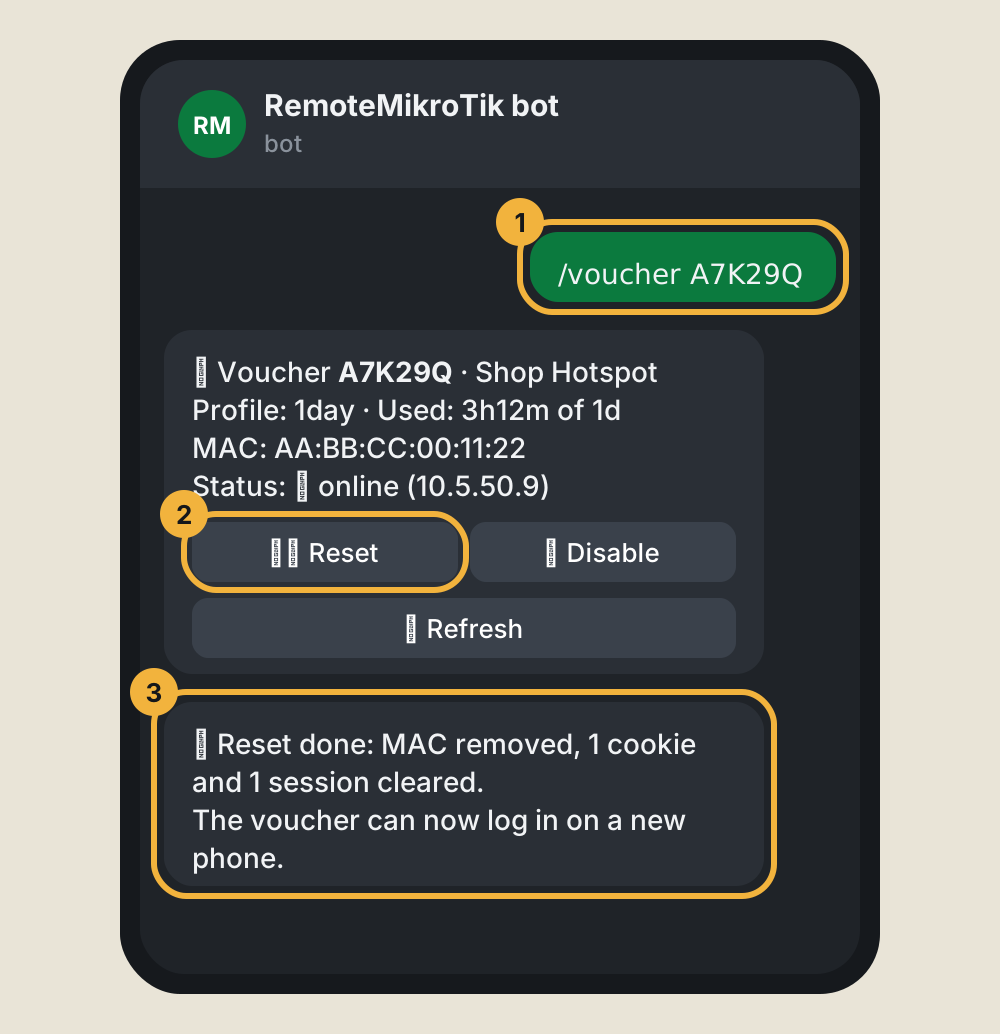
What Reset does on the router
| Part | Why |
|---|---|
| Removes the MAC address from the hotspot user | The voucher works on any device again |
| Deletes the cookie (saved login) | The old phone no longer logs in by itself |
| Ends the active session | Frees the voucher for the new device right away |
Other buttons: ⛔ Disable (asks once more, then blocks the voucher), ✅ Enable, and 🔄 Refresh to see the latest state. Every action is recorded under Recent actions on the router's page.
If something goes wrong
- "was not found": check the code. The bot lists the routers it checked; if the router with the voucher is offline, it is listed as not reachable.
- "included in the Pro plan": the routers you have are not on a plan with hotspot tools. See Change plan.
- "Too many requests": wait a minute. The bot allows 20 actions a minute.
Questions
Which routers are searched?
All your routers on a plan with hotspot tools that are online. The bot tells you which ones it checked, and which were not reachable.
Does Reset give the voucher more time?
No. The used time and limits stay as they are. Reset only lets the voucher log in again, on any device.
Can I create vouchers from Telegram?
No. Create vouchers the way you do now (Winbox, User Manager or your voucher tool). The bot is for checking and fixing them.
Still stuck? Open a support ticket and tell us which step didn't work.