Getting started
How RemoteMikroTik works
One picture and five minutes: what happens between your MikroTik, our server and your Winbox.
2 min read · Updated
RemoteMikroTik lets you open a MikroTik router from anywhere, even when the router has no public IP address. This page explains how, so the rest of the guide makes sense.
The problem it solves
Most routers today are behind someone else's NAT: the ISP uses CGNAT, the site runs on mobile data, or you simply can't get a static IP. You can't connect to such a router from outside, because nothing on the internet accepts the connection.
How the connection runs
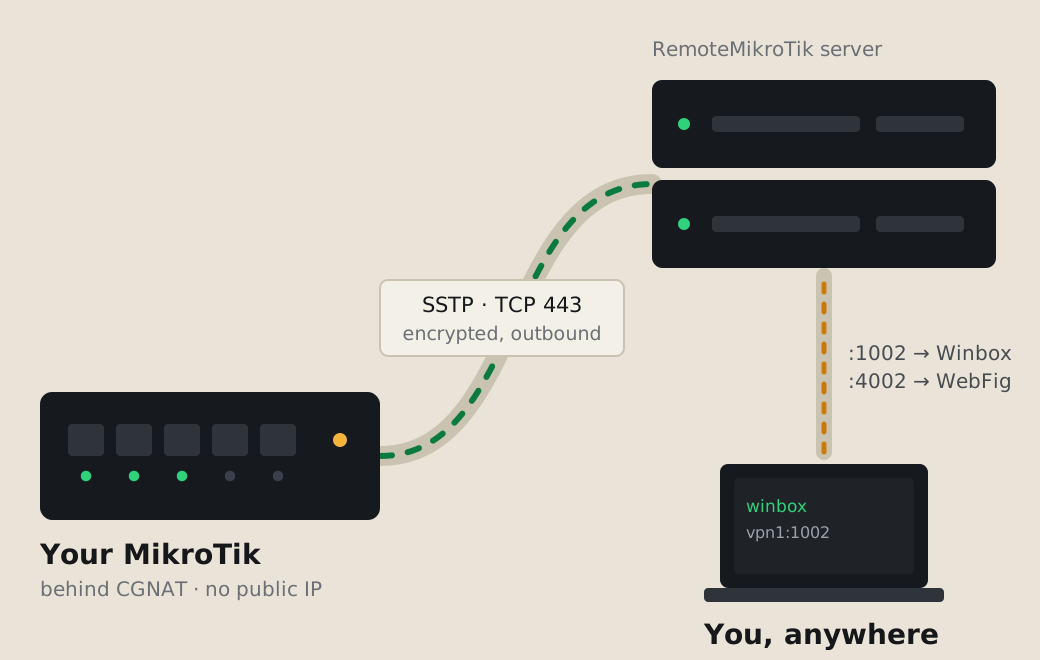
- Your router connects out to our server with SSTP on TCP port 443. Outgoing connections on 443 are allowed almost everywhere, so this works behind CGNAT and firewalls.
- The server gives your router a fixed tunnel address and reserves three public ports for it: one each for Winbox, WebFig and the API.
- You connect to those ports on our server, for example
vpn1.remotemikrotik.com:1002in Winbox. The server forwards the connection through the tunnel to your router.
The addresses and ports stay the same for as long as the router is in your account, even when you change plan.
What each plan opens
| Access | What it is | Plans |
|---|---|---|
| Winbox | The normal MikroTik management app | every plan |
| WebFig | The router's web page, in a browser | Standard and Pro |
| API | For your own scripts and apps | Standard and Pro |
See Plans and prices for everything else each plan includes.
What is protected, and how
- The tunnel is encrypted (SSTP uses TLS).
- You still log in with the router's own username and password. We never ask for your admin password.
- The panel uses its own router user for status checks, backups and Telegram tools. That user only works from inside the tunnel, so it is useless to anyone on the internet.
- API and SSH are opened for the tunnel only if they were off. Services you already use are left as they are.
More in Keep your router safe.
What you need
- A MikroTik router with RouterOS 6 or 7, and internet access at the site.
- Winbox (or any way to open the router's terminal) for the one-time setup.
- An account at https://remotemikrotik.com. The Free plan is enough to try it.
Next: Create your account.
Questions
Do I need a public IP or port forwarding at the site?
No. The router connects out to our server on TCP port 443, the same port as HTTPS, so it works behind CGNAT, on mobile data and behind most firewalls.
Which RouterOS versions work?
RouterOS 6 and 7. The setup uses the built-in SSTP client; nothing is installed on the router.
Can RemoteMikroTik see my traffic?
Only management connections you make through your ports (Winbox, WebFig, API) go through our server. The router's normal internet traffic does not use the tunnel.
Still stuck? Open a support ticket and tell us which step didn't work.