Billing
Change plan, monthly or yearly
Upgrades apply now; downgrades at the next renewal; yearly saves 20%.
1 min read · Updated
Open the router's page and use the Subscription box.
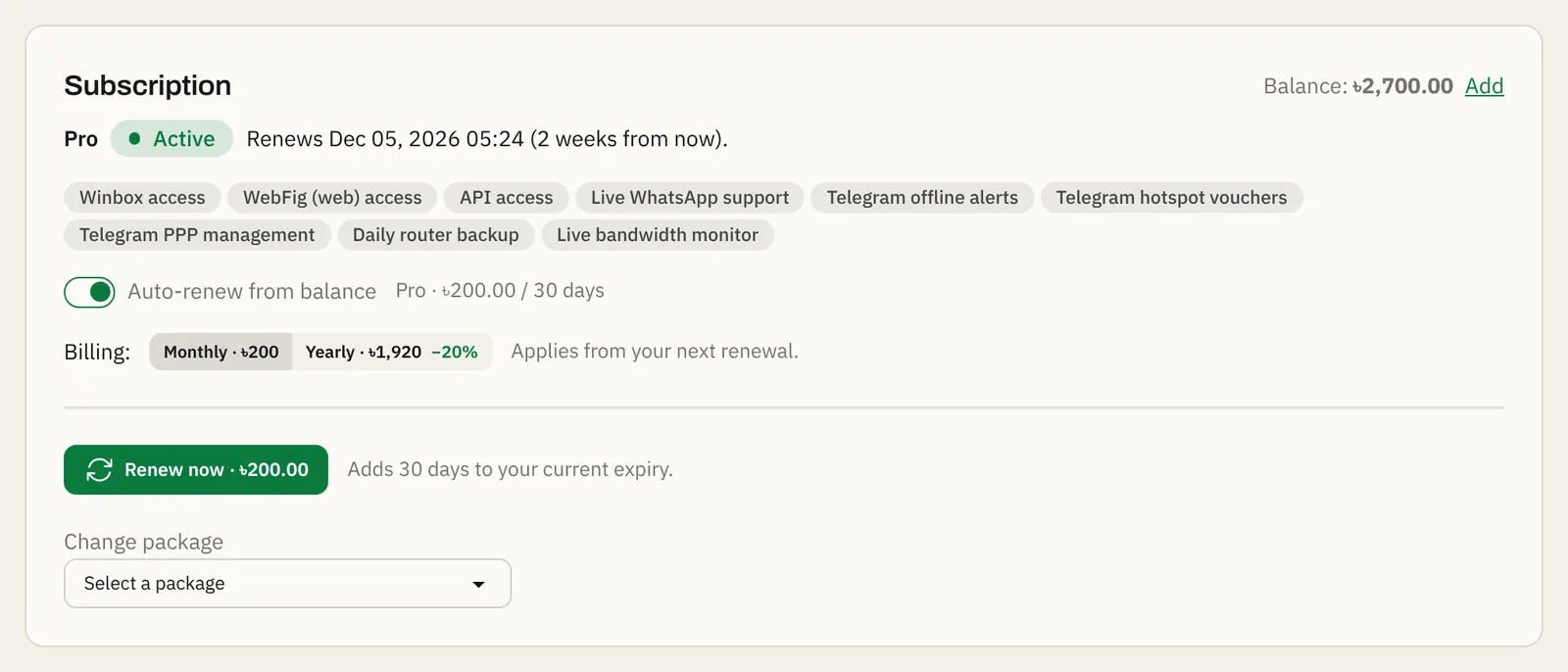
Steps
- Under Change package, choose the new plan. The panel shows what happens and what it costs before you confirm.
- For an upgrade (for example Standard to Pro), press Upgrade now. You pay only the difference for the days left in the current period, and the new features work at once.
- For a downgrade, press Switch at renewal. You keep the current plan until the period ends, then the cheaper plan starts.
- To pay yearly, choose Yearly under Billing. It applies from the next renewal; press Renew now if you want to start the yearly period today.
Leaving Free
Moving a router from Free to a paid plan starts a paid period today, charged from your balance.
If something goes wrong
- "Insufficient balance": add balance and try again.
- "You can have only 1 router on the Free plan": you already have a Free router.
Questions
Do my addresses change when I change plan?
No. The router keeps its tunnel IP and ports; a new plan only opens or closes WebFig and API ports and features.
Do I get money back when I downgrade?
No refund; the downgrade starts at your next renewal, so you keep what you paid for until then.
Still stuck? Open a support ticket and tell us which step didn't work.