Ahmad Foysal · · 3 min read
Am I Behind CGNAT? Three Quick Checks on a MikroTik
How to tell from your MikroTik whether you have a real public IP, which address ranges give CGNAT away, and your options when you do not have one.
You forwarded the port, the firewall looks right, and Winbox from outside still says timeout. Before you change anything else, check one thing: does your router have a public IP at all?
If your ISP uses CGNAT (carrier-grade NAT), it does not. Then no rule on your router can let anyone in, and you can stop debugging the port forward.
What CGNAT means
Public IPv4 addresses ran out years ago. Instead of giving each customer one, many ISPs give your router a private address and put hundreds of customers behind one shared public address. Outgoing traffic works normally. Incoming traffic arrives at the ISP's equipment, which has no idea which customer it is for, so it is dropped.
It is the normal setup on mobile data, 4G/5G home routers and Starlink, and very common with fibre and cable ISPs in Bangladesh, India, Pakistan, the Gulf and elsewhere.
Check 1: the address on your internet port
Open a terminal on the MikroTik:
/ip address print where interface=ether1
Use your own internet interface instead of ether1: pppoe-out1 for PPPoE, lte1 for a SIM. If you get the address by DHCP, /ip dhcp-client print shows it too.
| Address on the internet port | What it means |
|---|---|
100.64.x.x to 100.127.x.x |
CGNAT, for sure. This range is reserved for it. |
10.x.x.x, 172.16.x.x to 172.31.x.x, 192.168.x.x |
Private. Either CGNAT, or another router in front of yours (or both). |
| Anything else | Probably public. Do check 2 to be sure. |
Check 2: compare with what the internet sees
Turn on IP Cloud, wait a few seconds, then print it:
/ip cloud set ddns-enabled=yes
/ip cloud print
Look at public-address. That is the address the outside world sees for you. If it is the same as the address in check 1, you have a public IP. If it is different, something in between is doing NAT and incoming connections will not reach you. You can switch IP Cloud off again afterwards with ddns-enabled=no.
No IP Cloud? Open any "what is my IP" website from a computer behind the router and compare that address instead.
Check 3: traceroute
/tool traceroute 1.1.1.1 count=1
Look at the first few hops after your router. If one of them is a 100.64 to 100.127 address, or a private address that belongs to your ISP rather than your own network, your traffic is being translated by the ISP before it reaches the internet.
You are behind CGNAT. Now what?
You have four realistic options.
- Ask your ISP for a public IP. Often a paid extra, sometimes only on business plans, often not possible on mobile or satellite. If it is dynamic, you also need dynamic DNS.
- Use IPv6. If your ISP gives you IPv6, the router can be reachable that way. But the network you connect from also needs IPv6, and many office and mobile networks do not have it.
- Rent a server and build a VPN. It works, but you now maintain a server, its firewall and the VPN on both ends.
- Let the router dial out to a ready-made server. CGNAT blocks connections coming in, never going out. So the router opens an encrypted tunnel out, and you connect to the router through it.
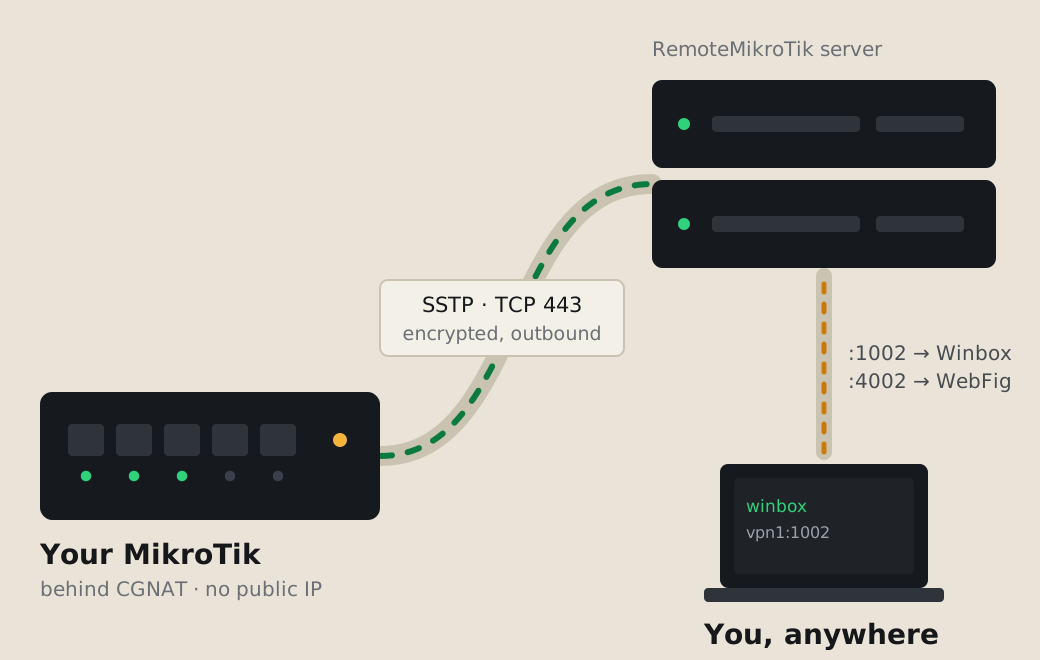
Option 4 is what RemoteMikroTik does. The tunnel is SSTP on TCP port 443, so it passes through almost any ISP and firewall. Your router gets a fixed address such as vpn1.remotemikrotik.com:1002 for Winbox, with WebFig and the API on their own ports (Standard and Pro). Your normal internet does not go through the tunnel.
Set it up in two minutes
- Create an account at https://remotemikrotik.com and choose Routers → Add router. Winbox for one router is on the Free plan.
- Copy the setup script, open New Terminal on the MikroTik, paste and press Enter.
- Paste the Winbox address from the panel into Winbox Connect To and log in with your own router user.
Step-by-step with screenshots: Add your first router. Line-specific guides: MikroTik on 4G or 5G and Winbox over Starlink. Not sure which method suits you? Read remote access options compared.
Common questions
Is 100.64.x.x a public IP?
No. 100.64.0.0/10 is reserved for carrier-grade NAT. If your router's internet port has an address from 100.64 to 100.127, you are behind CGNAT.
My router has a public address but port forwarding still fails.
Then CGNAT is not the cause. Check that the forward rule points to the right inside address and port, that your input or forward firewall does not drop it, and that you are testing from outside your own network. Some ISPs also block certain ports even on a public IP.
Will asking my ISP for a public IP fix it?
Yes, if they offer one. Many charge extra each month, many give it only on business plans, and mobile and satellite plans often do not offer it at all. A dynamic public IP also needs dynamic DNS.
Does CGNAT slow down my internet?
Usually not in a way you notice for browsing and video. It mainly stops incoming connections: remote access, hosting, some games and peer-to-peer apps.