Ahmad Foysal · · 4 min read
MikroTik on 4G or 5G: Open Winbox When the SIM Has No Public IP
Mobile lines almost never give a public IP, so port forwarding fails. This covers MikroTik LTE routers and MikroTiks behind a 4G/5G modem, in camps, shops and remote sites.
A MikroTik on a SIM card is the quickest way to put internet where there is no cable: a labour camp, a shop, a farm, a construction site, a CCTV pole. The problem starts later, when you want to open Winbox from somewhere else. You forward port 8291, try from outside, and get timeout.
The rules are fine. A mobile line almost never has a public IP address, so nothing from the internet can reach your router.
Why a 4G or 5G line blocks Winbox from outside
Mobile operators have far more customers than public IPv4 addresses. So they put SIMs behind carrier-grade NAT (CGNAT): your router gets a private address, and many customers share one public address on the operator's side. Incoming connections stop at the operator's equipment, because it has no rule that sends them to you.
This is normal on mobile data almost everywhere, including the big operators in the Gulf, South Asia and Africa. It applies to:
- a MikroTik with a built-in modem (LtAP, wAP LTE, Chateau and similar) and the SIM inside it
- a MikroTik plugged into a 4G/5G home router or MiFi from the operator (Huawei, ZTE and others)
- a USB modem on a hAP
With a 4G/5G home router in front, there are usually two NATs: the operator's CGNAT, and the home router's own NAT. Port forwarding would have to work through both. On the operator side it cannot.
Check it on your router
Find the address the operator gave you. On a MikroTik with the SIM inside:
/interface lte print
/ip address print where interface=lte1
If the MikroTik is behind a 5G router, use the name of the port that goes to that router instead of lte1, for example ether1. Then see what the internet sees:
/ip cloud print
IP Cloud must be on for this (/ip cloud set ddns-enabled=yes, wait a few seconds). If the router's own address is in 10.x.x.x, 100.64 to 100.127, 172.16 to 172.31 or 192.168.x.x, or it differs from the public-address line, nobody can connect to you from outside. For more ways to check, see Am I behind CGNAT?
What works: the router dials out
CGNAT blocks connections coming in. It never blocks connections going out, otherwise nobody could browse the web on mobile data. So you turn the direction around:
- The MikroTik opens an encrypted tunnel out to a server with a public address.
- The server gives your router its own fixed port.
- You open Winbox to that port, and the server passes you through the tunnel to the router.
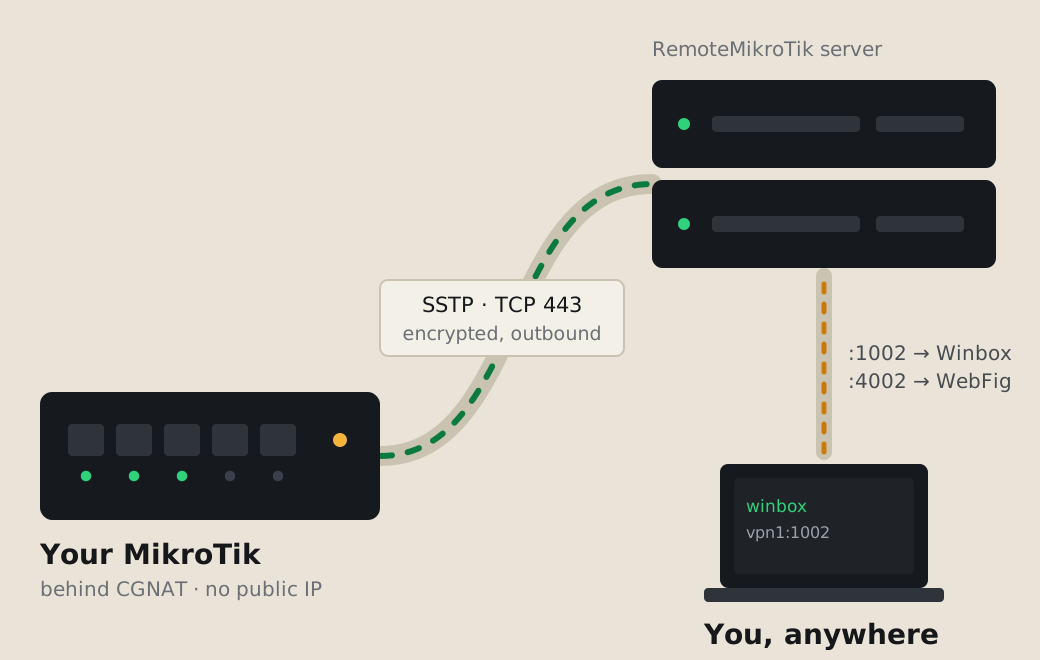
RemoteMikroTik is this, ready-made. The tunnel is SSTP on TCP port 443, the same port as normal HTTPS, so it passes through mobile networks and through a 4G/5G home router without any change on that side.
Set it up in about two minutes
- Create an account at https://remotemikrotik.com and choose Routers → Add router. The Free plan covers Winbox for one router.
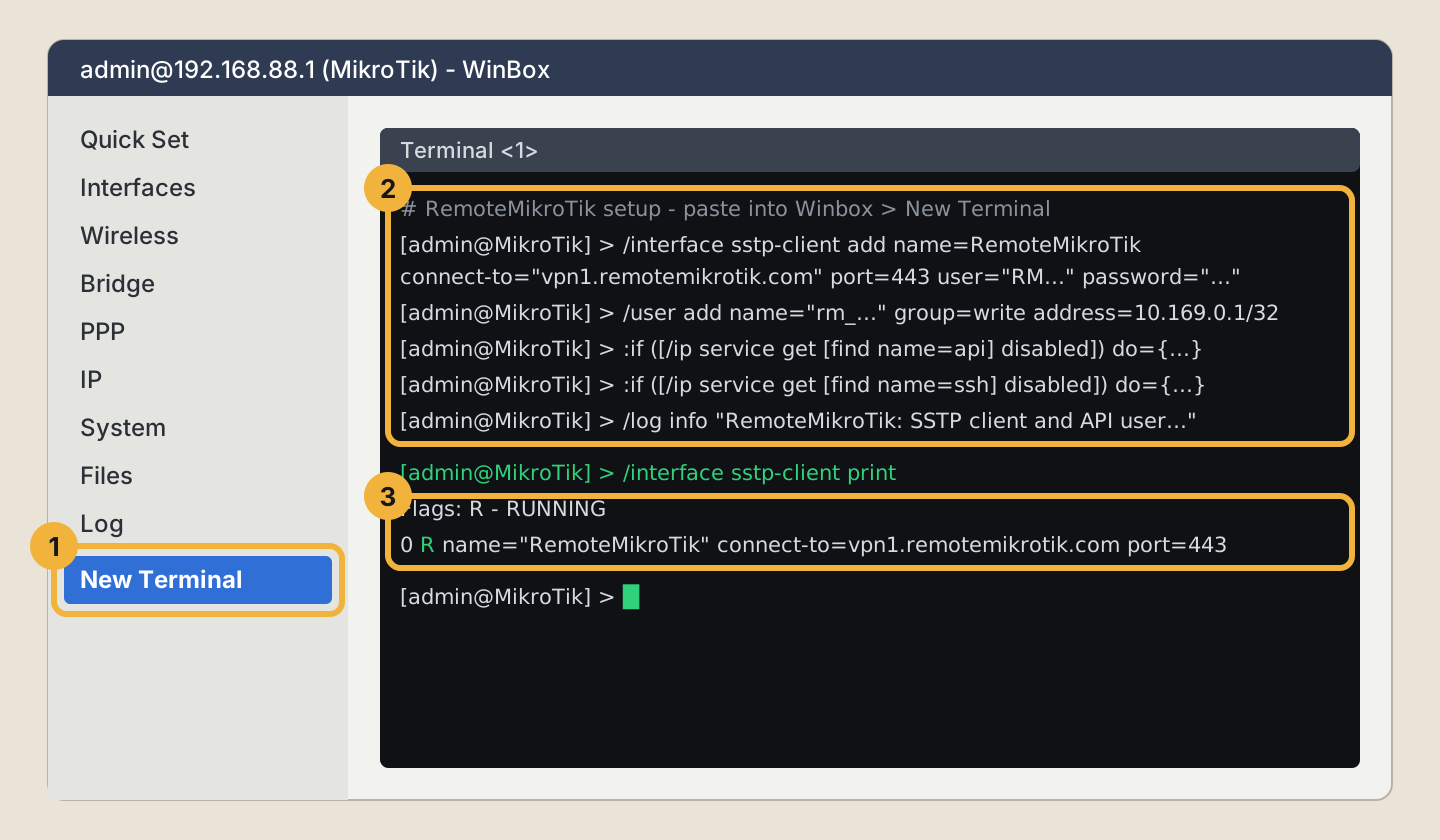
- Copy the setup script from the router's page.
- On the MikroTik, open New Terminal, paste the script and press Enter. Do it while you are on site, or ask someone there to open Winbox on the local network and paste it.
- Copy the Winbox address the panel shows, for example
vpn1.remotemikrotik.com:1002, and paste it into Winbox Connect To. Log in with your router's own user and password.
From then on the address stays the same, even when the SIM gets a new IP every day.
Things that matter on mobile lines
- Data use is small. The tunnel idles with tiny keep-alive packets. Only your own Winbox or API session uses it, and your users' internet goes straight out as before.
- Signal drops and SIM reconnects are handled by the router. The tunnel comes back by itself.
- Prepaid SIM ran out? The router shows offline, because it has no internet at all. With Pro you get a Telegram message when a router has been offline for 10 minutes, and another when it is back. That is often the first sign that someone forgot to recharge.
- Mobile hotspot business. If you sell vouchers on a 4G/5G hotspot, you can check and reset a voucher from Telegram without opening Winbox (Pro). See voucher not working on a new phone.
More than Winbox
- WebFig and the API get their own ports (Standard and Pro), so hotspot and billing software can reach a router on mobile data.
- Cameras and DVRs behind the router can get their own address with device ports.
- Nightly config backups keep the last 7 copies (Pro), useful for routers that sit far away.
Next steps
Follow Add your first router for every step with screenshots, or read how the tunnel works. If the router is on Starlink instead, see Winbox over Starlink.
Common questions
Does the tunnel use a lot of mobile data?
No. While nobody is connected, the tunnel only sends small keep-alive packets. Data is used only while you have Winbox, WebFig or the API open, and your users' normal internet does not go through the tunnel.
My MikroTik is behind a Huawei or ZTE 5G router. Will it work?
Yes. The tunnel only needs outgoing internet, so it works through one NAT or several. You do not need bridge mode or any setting on the 5G router.
What happens when the SIM gets a new IP?
Nothing changes for you. The router reconnects the tunnel by itself, usually within seconds, and your Winbox address stays the same.
Can I buy a public IP from my mobile operator instead?
Some operators sell a public or static IP on business plans or a special APN, usually for an extra monthly fee. Ask your operator. Many do not offer it at all on prepaid or home 5G plans.