Ahmad Foysal · · 2 min read
MikroTik Remote Access Without a Public IP: The Short Answer
A direct answer to remote MikroTik access with no public IP or behind CGNAT: what works, what fails, and how to set it up in a few minutes.
Yes, you can reach a MikroTik that has no public IP. The router must open the connection, not you. Set up an encrypted tunnel from the router out to a server, then connect to the router through it.
That is the whole idea. The rest of this page shows what works, what does not, and how to do it.
Why port forwarding fails
With no public IP, your ISP's equipment receives incoming traffic and has no way to know which customer it belongs to, so it drops it. This is CGNAT. It is normal on mobile data, 4G/5G routers and Starlink, and common on fibre and cable in many countries. No rule on your router can fix it. To confirm, see am I behind CGNAT.
What works and what does not
| Method | Works with no public IP? |
|---|---|
| Port forward + Winbox | No |
| MikroTik IP Cloud (DDNS) | No. It names an address you do not own. |
| Dynamic DNS from another provider | No, same reason |
| Ask the ISP for a public IP | Only if they offer one, often paid, not on most mobile plans |
| IPv6 | Only if both your ISP and the network you connect from have it |
| Your own VPS with a VPN | Yes, but you maintain the server and both ends |
| Router dials out to a ready-made server | Yes |
The last option works because CGNAT blocks connections coming in, never going out. For a longer comparison, read remote access options compared.
The fastest way: let the router dial out
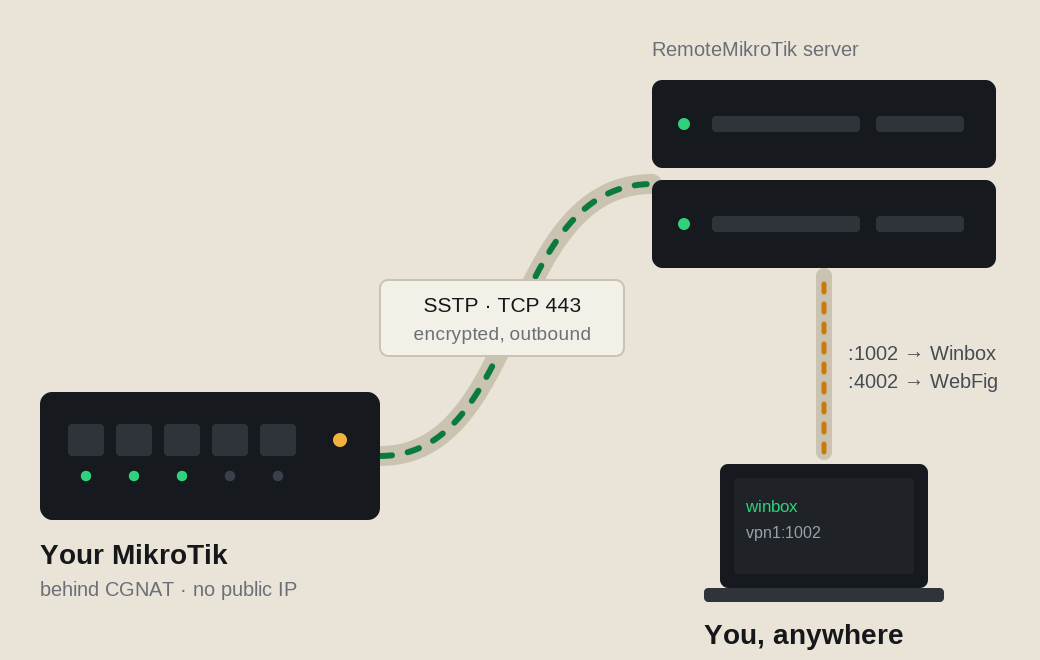
RemoteMikroTik does this for you. The router opens an SSTP tunnel on TCP port 443, the same port as normal HTTPS, so it passes through almost any ISP or firewall. You get a fixed address such as vpn1.remotemikrotik.com:1002 and connect to it from anywhere. Your normal internet traffic does not go through the tunnel.
Steps
- Create an account at https://remotemikrotik.com and choose Routers → Add router. Winbox for one router is on the Free plan.
- Copy the setup script. On the MikroTik open New Terminal, paste it and press Enter.
- Wait until the router shows online in the panel, then copy the Winbox address.
- Open Winbox, paste the address into Connect To and log in with your own router user.
Screenshots for each step: Add your first router. It works on RouterOS 6 and 7.
What you can reach through it
Winbox is on the Free plan. WebFig and the API get their own ports on paid plans (Standard and Pro). See Winbox, WebFig and API for how each one connects.
Is it safe?
The tunnel is encrypted, and your router's own login still protects it. RemoteMikroTik never asks for your admin password. Good habits still apply: strong passwords, and no needless open services. See keep your router safe.
If it does not connect
Check that the router has a working internet connection and that the clock is correct. The most common causes are in router shows offline.
Common questions
Can I use Winbox on a MikroTik that has no public IP?
Yes, but not by port forwarding. The router has to open a connection out to a server, and you reach it through that connection. A tunnel such as SSTP on port 443 does this.
Does IP Cloud (MikroTik DDNS) work behind CGNAT?
No. IP Cloud only gives your router a name for the address the internet sees. Behind CGNAT that address belongs to your ISP, not to you, so incoming connections never arrive.
Will this work on mobile data, 4G or Starlink?
Yes. These lines almost always use CGNAT, and an outgoing tunnel is not blocked by it.
Do I need to change anything at the ISP?
No. Nothing changes at the ISP or on the site's firewall. The router only needs internet access and one pasted setup script.
Is it free?
Winbox access for one router is on the Free plan. WebFig, the API and the Telegram tools are on paid plans.